
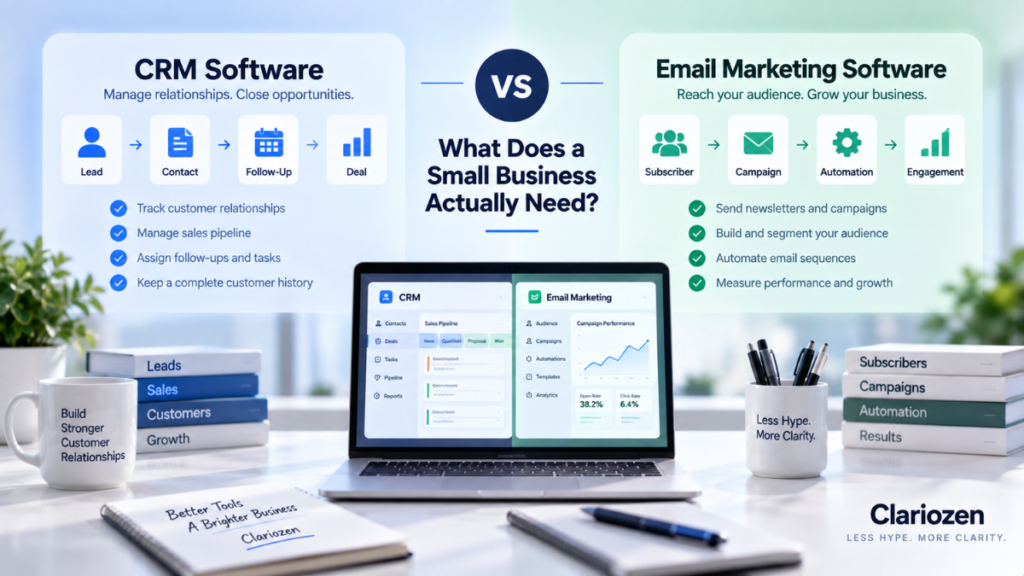
A customer fills out a form on your website.
Where should that information go?
Should they enter an email marketing platform so you can send newsletters and automated campaigns?
Should they become a contact in a CRM so someone can follow up with them?
Or do you need both?
This is where many small businesses run into confusion.
CRM and email marketing software both store contact information, both can send emails, and many modern platforms now include some features from the other category. That overlap can make them look more interchangeable than they really are.
But they are built around different jobs.
A CRM is primarily designed to manage relationships and sales activity.
Email marketing software is primarily designed to communicate with audiences at scale.
Understanding that difference makes the buying decision much easier.
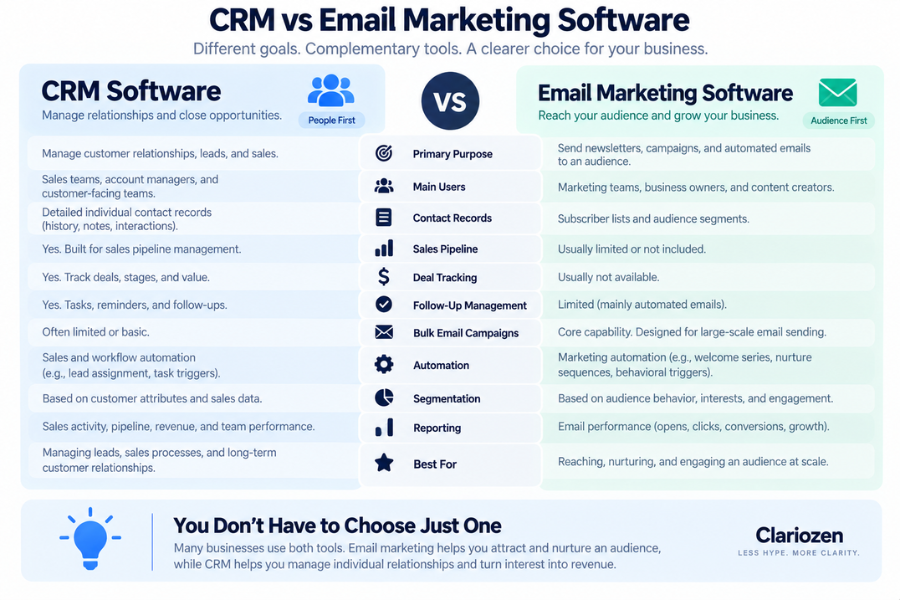
CRM vs Email Marketing Software at a Glance
| CRM Software | Email Marketing Software | |
|---|---|---|
| Primary purpose | Manage customer relationships and sales | Communicate and market to an audience |
| Main users | Sales, account management, customer teams | Marketing, founders, content teams |
| Contact records | Detailed individual records | Audience/subscriber focused |
| Sales pipeline | Usually yes | Usually limited or absent |
| Deal tracking | Yes | Usually no |
| Follow-up tasks | Yes | Limited |
| Bulk email campaigns | Often limited | Core capability |
| Newsletters | Sometimes | Core capability |
| Email automation | Sales/workflow focused | Marketing/nurture focused |
| Segmentation | Customer/sales attributes | Audience behavior and marketing attributes |
| Best for | Managing leads and relationships | Reaching and nurturing audiences |
CRM helps you manage people individually. Email marketing software helps you communicate with groups of people efficiently.
What Is CRM Software?
CRM stands for Customer Relationship Management.
A CRM provides a central place to organize information about leads, prospects, customers, and the interactions your business has with them.
Instead of customer information being scattered across:
spreadsheets,
email inboxes,
employees’ notes,
phones,
and individual memories,
a CRM attempts to create a shared customer record.
A typical CRM might show:
- Contact name and company
- Email and phone number
- Lead source
- Previous conversations
- Notes
- Sales opportunities
- Deal value
- Pipeline stage
- Tasks
- Next follow-up date
- Documents
- Customer history
The key idea is not simply storing contacts.
It is:
Knowing what is happening with each relationship and what needs to happen next.
What Is Email Marketing Software?
Email marketing software is built primarily for communicating with an audience through email.
Instead of asking:
“What should our salesperson do next with John?”
it is more likely to ask:
“Which subscribers should receive this campaign?”
Typical capabilities include:
- Email campaigns
- Newsletters
- Subscriber lists
- Templates
- Audience segmentation
- Signup forms
- Automated email sequences
- Welcome emails
- Behavioral triggers
- Open and click reporting
- A/B testing
- Unsubscribe management
- Marketing consent management
The focus is generally:
one business → many recipients
rather than:
one salesperson → one customer relationship
The Biggest Difference: Relationship Management vs Audience Communication
Consider a small B2B company with 2,000 contacts.
The marketing team wants to send:
“Our new 2027 Small Business Software Guide is available.”
They may want to send it to 1,200 relevant subscribers.
That’s an email marketing job.
Now imagine one recipient replies:
“We’re evaluating software for a 15-person sales team. Can someone contact me?”
That person has moved from being part of an audience to becoming an individual sales opportunity.
Now the business needs to know:
- Who owns the lead?
- Has anyone called them?
- What are they interested in?
- What is the potential deal value?
- What was discussed?
- When is the next follow-up?
- What stage is the opportunity in?
That’s a CRM job.
This distinction becomes very useful:
Email marketing creates and nurtures attention. CRM helps manage the relationship when individual attention matters.
When Does a Small Business Need a CRM?
You probably need CRM software when individual customer relationships are becoming difficult to manage manually.
Here are some common signals.
1. Leads Are Falling Through the Cracks
Someone requests information.
You reply.
Then nobody remembers to follow up.
If this happens regularly, a CRM can provide ownership, tasks, reminders, and pipeline visibility.
2. More Than One Person Handles Customers
A spreadsheet may work when one founder manages every lead.
It becomes much harder when:
salesperson A,
salesperson B,
customer service,
and management
all interact with the same customers.
A CRM gives everyone a shared record.
3. Your Sales Process Has Multiple Steps
Suppose your sales process looks like:
New Lead → Qualified → Meeting → Proposal → Negotiation → Won/Lost
That is exactly the type of workflow CRM software is designed to manage.
4. You Need to Know What’s in the Sales Pipeline
Questions such as:
How many active opportunities do we have?
What’s the potential value?
Which deals haven’t been contacted recently?
What might close this month?
are CRM questions.
5. Follow-Up Matters More Than Mass Communication
If your business wins customers through:
calls,
meetings,
quotes,
demos,
proposals,
or one-to-one conversations,
CRM functionality usually becomes increasingly important.
When Does a Small Business Need Email Marketing Software?
Email marketing software becomes more useful when you need to communicate repeatedly with groups of contacts or subscribers.
1. You Have a Growing Email List
If hundreds or thousands of people have subscribed to your content, promotions, updates, or offers, manually sending emails is no longer practical.
2. You Send Newsletters or Promotions
For example:
Weekly newsletter
Product announcements
Promotions
Educational content
Event invitations
New content notifications
These are classic email marketing use cases.
3. You Need Automated Email Sequences
For example:
Visitor downloads guide
        ↓
Welcome email
        ↓
Educational email
        ↓
Case study
        ↓
Product introduction
        ↓
Call to action
Email marketing platforms are built for this type of automation.
4. You Need Audience Segmentation
You may want different messages for:
Existing customers
New subscribers
People interested in CRM
People interested in AI tools
Customers who purchased Product A
Subscribers who clicked a particular campaign
Email marketing software makes this type of segmentation much easier.
5. You Need Marketing Performance Data
You may want to understand:
- Delivery
- Opens
- Clicks
- Conversions
- Unsubscribes
- Campaign performance
- Subscriber growth
Those are primarily marketing questions.
Do You Need Both?
For many growing businesses, eventually:
Yes.
But that does not mean every new business should immediately pay for two platforms.
Think about the customer journey.
A simplified version might look like:
Website Visitor
      ↓
Email Subscriber
      ↓
Marketing Emails
      ↓
Interested Lead
      ↓
CRM
      ↓
Sales Follow-Up
      ↓
Opportunity
      ↓
Customer
Email marketing and CRM can therefore work together rather than compete with each other.
The email platform helps:
attract → educate → nurture
The CRM helps:
qualify → follow up → sell → manage
Example: A Small B2B Service Company
Imagine a consulting company receives 100 new contacts each month.
Most people:
download a guide,
subscribe to updates,
or read educational content.
It doesn’t make sense for a salesperson to call every person.
Email marketing software can nurture those contacts automatically.
But perhaps 10 people request consultations.
Those 10 should enter a CRM.
Now someone can:
assign the lead,
record conversations,
schedule follow-ups,
create an opportunity,
and track whether the deal closes.
This is a good example of the two systems doing different jobs.
Example: A Local Service Business
Imagine a local landscaping company.
It gets around 30 quote requests per month and rarely sends newsletters.
Its biggest problem is:
following up with quotes and remembering which prospects haven’t responded.
In that situation, CRM may be much more important than sophisticated email marketing.
The company could potentially start with:
CRM first.
Example: A Content-Driven Online Business
Now imagine an online creator or small media business with:
20,000 subscribers,
digital products,
regular newsletters,
and relatively little one-to-one selling.
Here:
Email marketing software may be the priority.
A sophisticated sales CRM might add very little value.
A Simple Decision Framework
Choose CRM First If…
✓ You manage individual leads or customers.
✓ Sales follow-up is important.
✓ Multiple people communicate with customers.
✓ You use a sales pipeline.
✓ Deals involve calls, meetings, quotes, or proposals.
✓ Leads are being forgotten.
Choose Email Marketing First If…
✓ You have an audience or subscriber list.
✓ You send newsletters or promotions.
✓ You need automated nurture sequences.
✓ You communicate with hundreds or thousands of people.
✓ Segmentation matters.
✓ Marketing campaign performance matters.
Consider Both If…
✓ Marketing generates leads for sales.
✓ You have both a subscriber audience and a sales team.
✓ Leads need nurturing before becoming opportunities.
✓ You want marketing and sales activity connected.
✓ Your customer journey spans both mass communication and one-to-one follow-up.
What About Platforms That Do Both?
This is where the market becomes more complicated.
Some modern platforms combine:
CRM,
email marketing,
automation,
forms,
landing pages,
customer service,
and other capabilities
inside one ecosystem.
This can be attractive for a small business because fewer platforms can mean:
- Less data duplication
- Fewer integrations
- Simpler administration
- More complete customer history
But an all-in-one platform is not automatically better.
The trade-off can be:
- Higher cost
- More complexity
- Features locked behind higher plans
- Paying for capabilities you don’t use
- Greater dependence on one vendor
So don’t ask only:
“Can this platform do both?”
Ask:
“Does it do the parts we actually need well enough, at a price that makes sense?”
One Platform vs Two Specialized Tools
| One Integrated Platform | Two Specialized Tools |
|---|---|
| Simpler data flow | Potentially stronger specialized features |
| Fewer integrations | More flexibility |
| One vendor/account | Can choose best tool for each job |
| Potentially easier setup | Integration may be required |
| Can become expensive as needs grow | Two subscriptions to manage |
| Greater vendor dependence | Easier to replace one component |
Neither approach is automatically better.
For a very small business, simplicity may matter more.
For a growing business with more specialized needs, separate tools may provide greater flexibility.
Don’t Choose Based on the Number of Features
This is especially important when comparing CRM and marketing platforms.
You might see:
Platform A — 200+ features
and:
Platform B — 80 features
That does not tell you which one is better.
Return to the buying framework from our previous guide:
- What problem are we solving?
- What are our must-have features?
- Who will use the software?
- What is the real annual cost?
- What integrations do we need?
- What are the important limitations?
You can read our complete guide:
How to Choose Business Software for a Small Business →
Watch the Pricing Model
CRM and email marketing software often increase in price for different reasons.
CRM Pricing May Increase With:
- Number of users
- Advanced sales features
- Automation
- Reporting
- AI capabilities
- Support level
Email Marketing Pricing May Increase With:
- Number of contacts
- Number of emails sent
- Automation capabilities
- Advanced segmentation
- Additional users
- Marketing channels
This difference matters.
Imagine a business with:
3 salespeople + 50,000 email subscribers.
A per-user CRM might still be affordable.
An email marketing platform priced by contacts could become much more expensive.
Another business might have:
30 salespeople + 2,000 subscribers.
Now the economics could be completely different.
Always model the price around your actual usage, not the advertised starting plan.
Don’t Forget Integration
If you choose separate CRM and email marketing platforms, investigate how they exchange data.
Ideally, you should understand:
When someone subscribes, where is the contact created?
When a lead becomes qualified, does the CRM know?
When someone becomes a customer, can marketing emails change automatically?
Are unsubscribes synchronized?
Which system is the primary source of customer data?
Poor integration can create duplicate records and inconsistent information.
A cheaper combination of two products may not be cheaper if employees spend hours manually moving data between them.
CRM vs Email Marketing Software: Which Should You Choose?
For many small businesses, the answer comes down to the primary workflow.
If your biggest problem is…
Managing individual leads and sales follow-up
→ Start with CRM software.
If your biggest problem is…
Communicating with and nurturing an audience
→ Start with email marketing software.
If your business does both…
Marketing generates leads that require individual sales follow-up
→ Consider using both, either through an integrated platform or two connected tools.
Before You Buy: 8 Questions
Checklist Box。
CRM vs Email Marketing Buying Checklist
□ Are we managing individual sales opportunities or an audience—or both?
□ Do we need a sales pipeline?
□ Do we regularly send newsletters or campaigns?
□ Do we need automated marketing sequences?
□ How many employees need accounts?
□ How many contacts or subscribers do we have?
□ What will each option cost at our actual usage level?
□ Do our CRM and marketing systems need to share data?
Answer these questions before comparing product names.
Final Thoughts
Start With the Workflow, Not the Category
CRM and email marketing software overlap more than they once did.
A CRM may include email campaigns.
An email marketing platform may include contact management and sales features.
And some platforms try to provide both.
But the fundamental buying question remains straightforward:
What are you trying to manage?
If you’re managing individual customer relationships and sales opportunities, start by looking at CRM.
If you’re managing an audience and marketing communication, start with email marketing.
If your business needs to turn an audience into leads and leads into customers, you may eventually need both.
The goal isn’t to build the biggest software stack.
It’s to build the smallest stack that reliably supports the way your business actually works.
Ready to Compare Your Options?
Explore Clariozen’s business software research and comparisons to find tools that fit the way your business works.