
Choosing software for a small business sounds simple until you start comparing your options.
Search for a CRM, email marketing platform, project management tool, website builder, or accounting solution and you can quickly end up with dozens of products that appear to do roughly the same thing.
Most promise to save time, increase productivity, automate work, or help your business grow.
The harder question is:
Which one actually fits the way your business works?
For a small business, choosing the wrong software is not just about wasting a monthly subscription fee. A poor choice can create unnecessary complexity, duplicate work, lock important data into the wrong platform, and eventually force you to move your entire workflow somewhere else.
The good news is that you don’t need to compare every feature of every product.
You need a better buying process.
This guide walks through a practical framework for choosing business software based on your actual requirements, total cost, usability, integrations, and long-term fit.
1. Start With the Problem, Not the Software
One of the easiest mistakes to make is starting with a product.
You hear about a popular platform, see an advertisement, watch a demonstration, or notice that another company uses it. Then you begin asking:
“Should we use this?”
A better question is:
“What problem are we trying to solve?”
Suppose a small business says:
“We need a CRM.”
That still doesn’t tell us very much.
The underlying problem might actually be:
- Leads are being forgotten after the first conversation.
- Salespeople don’t know when to follow up.
- Customer information is scattered across spreadsheets and email.
- Management cannot see the sales pipeline.
- Marketing leads aren’t reaching the sales team.
Those are very different problems.
A sophisticated CRM with hundreds of features may be unnecessary if the real requirement is simply:
Keep customer information organized and make sure nobody forgets the next follow-up.
Before researching products, write down:
We need software that helps us ________.
Try to complete that sentence in one or two lines.
That becomes your buying objective.
2. Separate Must-Have Features From Nice-to-Have Features
Once you understand the problem, create two lists:
Must Have
These are capabilities without which the software cannot solve your problem.
Nice to Have
These features could improve the experience but are not necessary for the purchase to make sense.
For example, imagine a five-person sales team evaluating CRM software.
Their list might look like this:
| Must Have | Nice to Have |
|---|---|
| Contact management | AI email writing |
| Sales pipeline | Advanced forecasting |
| Follow-up reminders | Call transcription |
| Email integration | Custom dashboards |
| Basic reporting | Predictive lead scoring |
| Mobile access | Advanced automation |
This distinction matters because software companies naturally emphasize their largest feature lists.
But more features do not automatically mean more value.
Sometimes they simply mean:
more configuration,
more training,
more expensive plans,
and more things your team never uses.
For a small business, a simpler product that handles five essential tasks well can be a better choice than a platform offering fifty additional capabilities.
3. Think About Who Will Actually Use It
Software should not be evaluated only from the owner’s or manager’s perspective.
Ask:
Who will use this every day?
There is an important difference between software being technically capable of doing something and employees actually using that capability.
Consider:
- How technically experienced are the users?
- How much training will they need?
- How often will they use the software?
- Will they use it primarily on desktop or mobile?
- Does the workflow make sense for their jobs?
- Will everyone need a paid account?
- Who will administer the system?
This leads to one of the most overlooked software costs:
Complexity
A platform might cost only $30 per user per month.
But if it requires weeks of configuration and employees avoid using it because it is confusing, the subscription price isn’t the main problem.
Adoption is.
For many small businesses:
Software people will actually use is more valuable than software with the longest feature list.
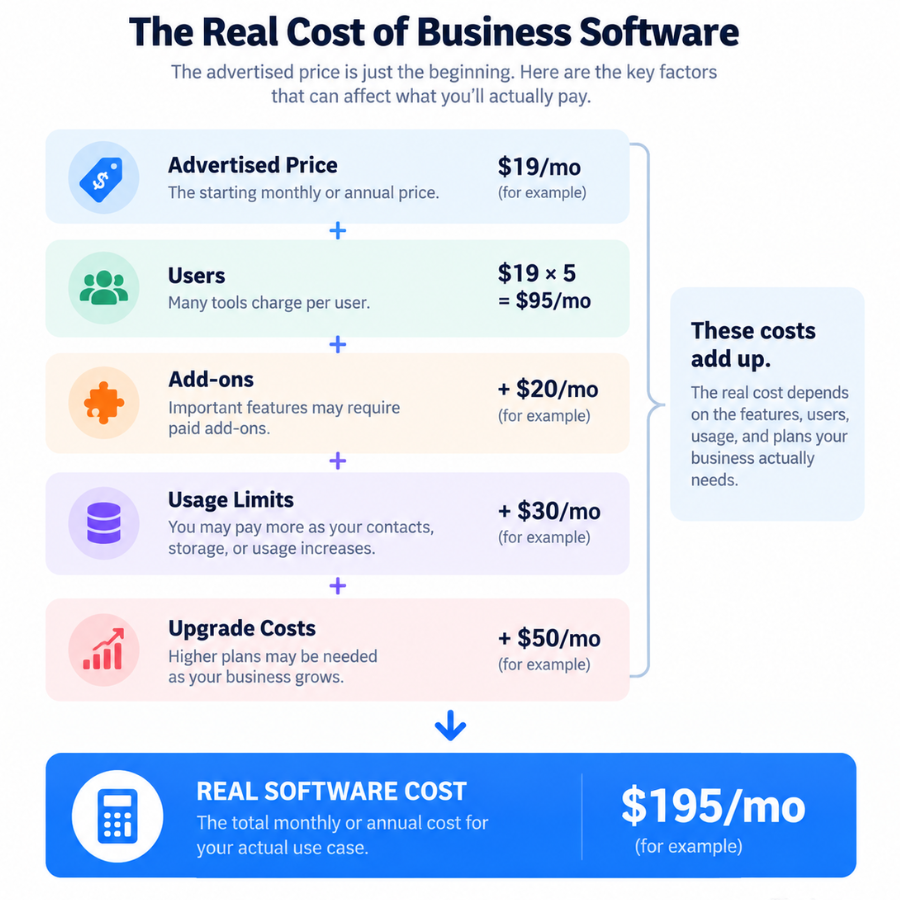
4. Compare the Real Cost — Not Just the Starting Price
This is one of the most important parts of buying software.
A pricing page may say:
Starting at $19/month
But that does not necessarily mean your business will pay $19 per month.
You need to understand the real cost of the configuration you actually need.
Check:
- Monthly vs. annual billing
- Price per user
- Minimum number of users
- Feature restrictions by plan
- Usage limits
- Storage limits
- Contact or subscriber limits
- AI usage allowances
- Transaction fees
- Add-ons
- Onboarding fees
- Support tiers
- Renewal pricing
For example:
A $20/month product that requires five user licenses actually costs:
$100/month
or:
$1,200/year
before add-ons.
Meanwhile, a $50/month product with unlimited users could potentially cost less for the same business.
This is why Clariozen recommends comparing:
Expected annual cost for your actual use case
rather than simply comparing advertised starting prices.
5. Pay Attention to Pricing Triggers
Many SaaS products become more expensive as your business grows.
The important question is:
What causes the price to increase?
Common pricing triggers include:
Users
More employees require more licenses.
Contacts
CRM and email platforms may charge more as your database grows.
Usage
AI, automation, API calls, storage, or transactions may have limits.
Features
Important capabilities may only be available on higher plans.
Revenue or transactions
Some e-commerce and payment services charge based on transaction volume.
Before subscribing, imagine your business 12–24 months from now.
Ask:
If we double our users, customers, contacts, or usage, what happens to the price?
A cheap product today can become an expensive platform later.
6. Check Integrations Before You Buy
Software rarely operates alone.
A small business might already use:
- Gmail or Microsoft 365
- Accounting software
- Website forms
- CRM
- Email marketing
- Calendar
- E-commerce platform
- Payment processor
- Project management
- Slack or Teams
- Zapier or another automation platform
Before buying another product, ask:
Does it work with the tools we already use?
And don’t stop at seeing an integration logo on the website.
Check what the integration actually does.
There is a big difference between:
“Integrates with Google”
and:
“Automatically syncs Gmail conversations with CRM contacts and allows calendar scheduling.”
Also check whether the integration:
- Is native
- Requires a third-party automation service
- Requires a higher pricing tier
- Has usage limitations
- Supports two-way synchronization
- Requires technical setup
Integration problems often appear after a company has already committed to the software.
Checking first is much easier.
7. Evaluate Ease of Use in a Real Workflow
A polished homepage and impressive demo do not necessarily tell you whether software will work well every day.
When a free trial or demo is available, try completing a real task.
For example, with CRM software:
Add a lead → record a conversation → schedule a follow-up → move the opportunity → find it again tomorrow.
For project management software:
Create a project → assign a task → set a deadline → attach a file → leave a comment → find overdue work.
For email marketing:
Import contacts → create an email → build an automation → review reporting.
The question isn’t:
“Does the interface look good?”
It is:
“How easily can we complete the work we actually need to do?”
That is a much better usability test.
8. Understand What Happens When You Need Help
Customer support often feels unimportant while evaluating software.
It becomes very important when something stops working.
Check what support is actually included:
- Live chat
- Phone
- Knowledge base
- Community
- Onboarding
- Dedicated account manager
- Priority support
Also check whether support depends on your plan.
A provider may advertise:
“24/7 support”
while phone support is available only to higher-tier customers.
For business-critical software, support deserves more weight than it does for a tool you use occasionally.
9. Look for the Limitations, Not Just the Benefits
Most product pages are designed to explain why you should buy.
Your job as a buyer is also to understand:
Why might I not buy this?
Look for limitations such as:
- Important features locked behind expensive plans
- Low usage limits
- Limited customization
- Weak reporting
- Difficult data export
- Poor integrations
- Steep learning curve
- Limited support
- Long contracts
- Expensive upgrades
This doesn’t mean the product is bad.
Every software product makes trade-offs.
The goal is to determine whether those trade-offs matter for your business.
A limitation that makes a product unsuitable for one company may be completely irrelevant to another.
10. Think About Switching Before You Subscribe
This sounds strange, but before choosing software, ask:
How difficult would it be to leave?
Consider what happens to:
customer records,
documents,
emails,
automations,
reports,
historical data,
integrations,
and workflows.
Check whether you can export your data and in what format.
This matters because switching costs increase over time.
The longer a company uses a CRM, accounting system, project platform, or marketing automation tool, the more operational knowledge and data become connected to it.
You don’t need a product you’ll use forever.
But you should understand the exit before building your business around it.
11. Compare Two or Three Serious Options
Once you have completed the earlier steps, narrow the market.
Don’t try to evaluate 20 products equally.
Choose perhaps 2–3 realistic finalists.
Then create a simple comparison:
| Factor | Product A | Product B | Product C |
|---|---|---|---|
| Must-have features | ✓ | ✓ | ✓ |
| Ease of use | Good | Excellent | Average |
| Integrations | Excellent | Good | Good |
| Support | Good | Good | Limited |
| Annual cost | $ | $$ | $ |
| Scalability | Good | Excellent | Average |
| Main limitation | — | — | — |
You don’t need a complicated scoring algorithm.
Often the trade-offs become obvious once the information is organized around your actual requirements.
12. Use a Simple Buying Framework
At Clariozen, we generally think about business software across six practical areas:
Features
Does it solve the core problem?
Pricing
What will you actually pay for the capabilities you need?
Ease of Use
Can the intended users realistically learn and use it?
Integrations
Does it work with the rest of your technology stack?
Support
What help is available when something goes wrong?
Best Fit
What type of business or user is the product actually designed for?
You can learn more about our approach on our How We Evaluate page.
A Simple Software Buying Checklist
Before You Buy
□ What specific problem are we solving?
□ What are our 3–5 must-have features?
□ Who will actually use the software?
□ What will it cost for our real number of users?
□ What causes the price to increase?
□ Does it integrate with our existing tools?
□ Have we tried a real workflow?
□ What support is included?
□ What are the product’s important limitations?
□ Can we export our data if we leave?
□ What are the 2–3 strongest alternatives?
If you cannot answer several of these questions, you probably aren’t ready to buy yet.
Final Thoughts
The Best Software Is the Software That Fits
There is no single “best business software” for every small business.
A two-person consulting company and a 50-person sales organization may need completely different tools even when they are trying to solve the same general problem.
Instead of asking:
“What is the best software?”
ask:
“What is the best fit for the way our business actually works?”
Start with the problem.
Identify the features you genuinely need.
Understand the real cost.
Check usability and integrations.
Look for limitations.
Then compare a small number of serious options.
That process may be less exciting than choosing the product with the biggest feature list—but it is much more likely to lead to software your business will actually use.
Explore Business Software
Ready to start comparing your options? Explore Clariozen’s software research, comparisons, and buying guides.