
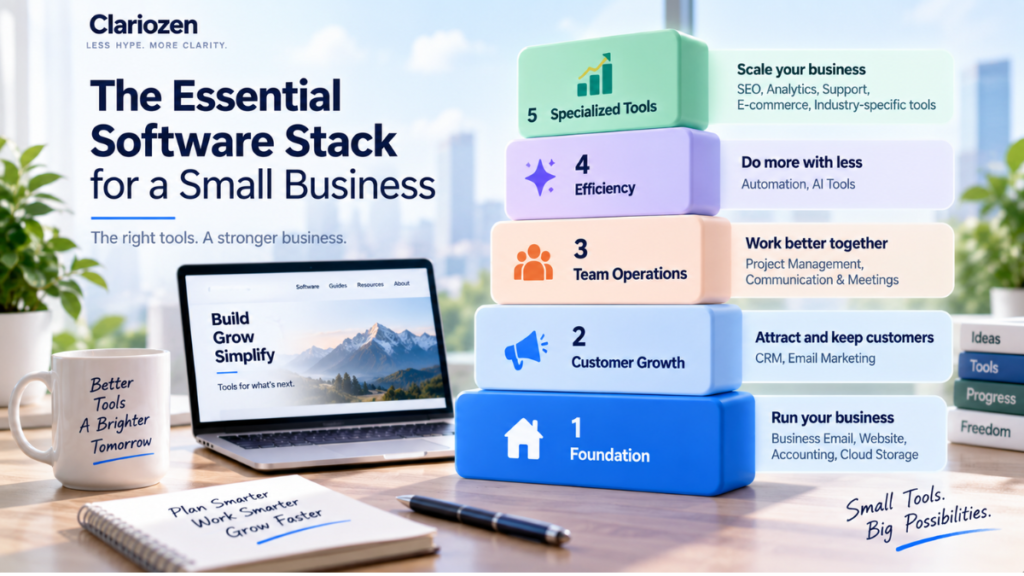
A small business can now run much of its operation from a laptop.
Email, customer management, accounting, websites, marketing, project management, payments, automation, and even parts of research and content creation can all be handled through cloud software.
The problem is no longer finding software.
It’s deciding how much software you actually need.
A new business can easily end up paying for:
a CRM,
email marketing platform,
project management tool,
accounting software,
AI assistant,
automation platform,
cloud storage,
meeting software,
SEO tools,
and several smaller subscriptions.
Individually, each tool may seem inexpensive.
Together, they can become a complicated and costly software stack.
A better approach is to build your stack around the way your business actually operates.
Start with the essential workflows. Add specialized software when a real need appears.
This guide explains what a practical small business software stack can look like—and which tools you may not need yet.
What Is a Software Stack?
A software stack is simply the collection of software and digital tools a business uses to operate.
For a small business, that might include:
Email + Website + Accounting + CRM + Project Management + AI
For another business:
E-commerce + Payments + Email Marketing + Accounting + Customer Support
There is no universal stack.
A local contractor, consulting firm, online retailer, SaaS company, and five-person sales organization all have different workflows.
That’s why the goal should not be:
“What software does every small business need?”
A better question is:
“Which business functions need software in our company?”
The Small Business Software Stack at a Glance
| Business Need | Software Category | Priority |
|---|---|---|
| Communication | Business Email | Essential |
| Online presence | Website / Website Builder | Essential for most |
| Money & records | Accounting / Bookkeeping | Essential |
| Files & documents | Cloud Storage | Essential |
| Leads & customers | CRM | Depends on sales process |
| Audience communication | Email Marketing | Depends on marketing model |
| Tasks & teamwork | Project Management | As complexity grows |
| Meetings | Video Conferencing | As needed |
| Payments | Payment Processing | Depends on business model |
| Efficiency | Automation | Add when repetition appears |
| AI assistance | AI Tools | Add for specific workflows |
| Specialized growth | SEO / Analytics / Support etc. | Add when justified |
The key word here is:
Priority.
Not every category needs a separate paid subscription from day one.
Layer 1 — The Foundation
Start with the software that supports basic business operations.
For many small businesses, this means four areas.
1. Business Email
Email is still one of the most basic pieces of business infrastructure.
A professional business should generally use an address associated with its own domain, such as:
rather than relying exclusively on a personal email address.
A business email system may also provide:
- Calendar
- Contacts
- Shared calendars
- Document collaboration
- Cloud storage
- Video meetings
This is important because one subscription may already solve several needs.
Avoid Buying Duplicate Tools Too Early
If your email suite already includes:
calendar,
video meetings,
documents,
and cloud storage,
you may not immediately need separate paid products for all four.
Before adding software, check what your existing tools already include.
2. Website and Online Presence
For many businesses, a website is the central online location where potential customers can understand:
who you are,
what you offer,
how to contact you,
and what they should do next.
The right website setup depends heavily on the business.
A simple service company may need:
Website + Contact Form
An online store may need:
E-commerce Platform + Payments + Inventory
A content business may need:
CMS + Analytics + Email Capture
Don’t automatically choose the platform with the most features.
Choose the setup appropriate for what the website is supposed to accomplish.
3. Accounting and Bookkeeping
Financial records become important almost immediately.
Accounting or bookkeeping software can help businesses organize:
- Income
- Expenses
- Invoices
- Receipts
- Bank transactions
- Financial reports
- Tax-related records
The exact requirements vary by business and jurisdiction, and software does not replace professional accounting or tax advice when that is needed.
But from a software-stack perspective, financial recordkeeping belongs near the foundation—not as an afterthought.
4. Cloud Storage and Documents
Small businesses generate a surprising amount of information:
contracts,
quotes,
presentations,
images,
spreadsheets,
customer files,
invoices,
marketing materials.
A consistent cloud storage and document system can reduce one common problem:
Important information living on individual employees’ computers.
Before buying a standalone solution, again check what your existing business email or productivity suite includes.
Layer 2 — Customer Growth
Once the foundation exists, the next layer depends on how your business gets customers.
This is where CRM and email marketing enter the stack.
5. CRM Software
You probably don’t need a CRM merely because “businesses use CRM.”
You need one when managing individual customer relationships becomes difficult.
Common signals include:
- Leads are being forgotten
- Multiple people handle customers
- Sales involves several stages
- Follow-up matters
- Quotes or proposals need tracking
- Management needs pipeline visibility
A CRM can help organize:
Lead → Follow-Up → Opportunity → Customer
For a solo business with five active customers, a spreadsheet may still be enough.
For a sales team managing hundreds of opportunities, it probably isn’t.
Add CRM when relationship complexity justifies it.
Internal link:
CRM vs Email Marketing Software: What Does a Small Business Actually Need? →
6. Email Marketing Software
Email marketing software serves a different purpose.
It becomes useful when you need to communicate with an audience through:
- Newsletters
- Promotions
- Educational campaigns
- Welcome sequences
- Lead nurturing
- Automated emails
- Audience segmentation
A small consulting business that wins customers through individual outreach may not need sophisticated email marketing immediately.
A content or e-commerce business with thousands of subscribers probably will.
So don’t ask:
“Should small businesses use email marketing?”
Ask:
“Is email an important part of how our business acquires, nurtures, or retains customers?”
If yes, it belongs in the stack.
Layer 3 — Team Operations
As more people become involved, coordination starts becoming a software problem.
7. Project and Task Management
At the beginning, tasks may live in:
email,
chat,
notebooks,
spreadsheets,
or someone’s memory.
That can work—until it doesn’t.
Project management software becomes more useful when:
- Multiple people own tasks
- Deadlines are being missed
- Projects contain many steps
- Files and discussions are scattered
- Management lacks visibility
- Recurring workflows need consistency
The goal isn’t to create a complicated project management system.
It’s to answer:
Who is doing what, and by when?
For a very small team, a simple task board may be enough.
8. Communication and Meetings
Before subscribing to a dedicated communication or video platform, look at what is already included in your existing stack.
You may already have:
- Team chat
- Video meetings
- Calendar
- Screen sharing
- File collaboration
through another product.
This is a recurring principle in building a lean stack:
Use what you already pay for before adding another subscription.
A separate tool becomes worthwhile when it meaningfully improves the workflow—not simply because it is popular.
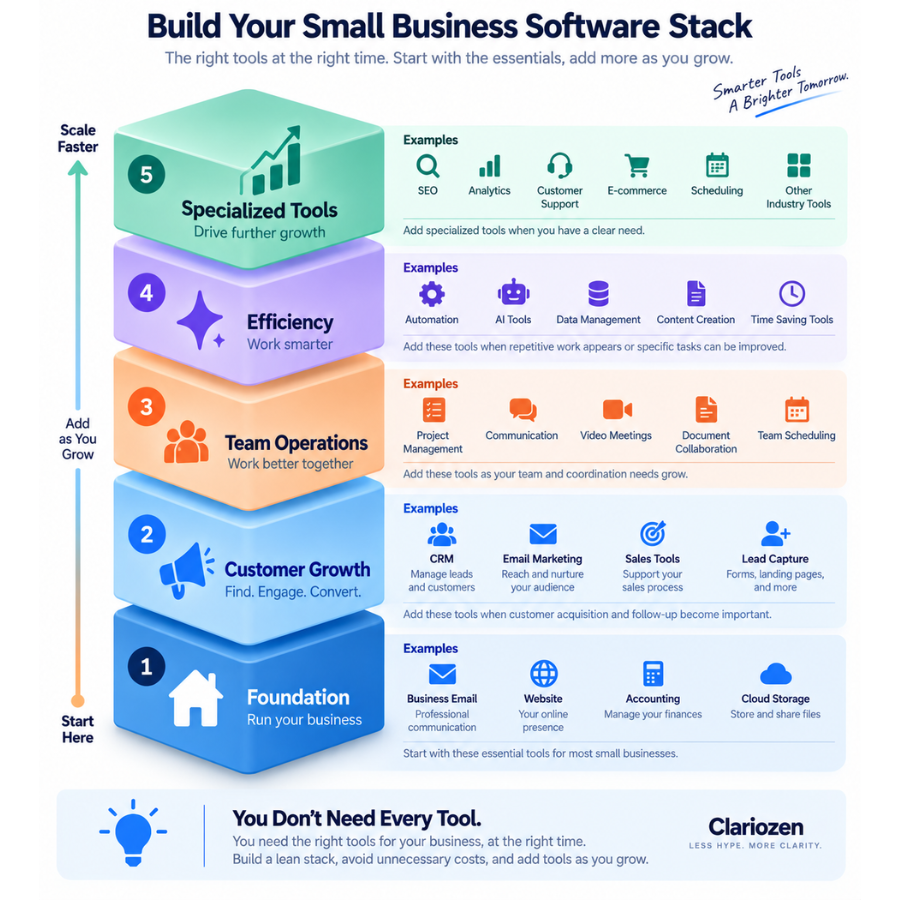
Layer 4 — Efficiency and Automation
Only after repeatable workflows exist should you start asking what can be automated.
9. Automation Software
Automation software can connect different systems and reduce repetitive work.
For example:
Website Form
     ↓
Create CRM Contact
     ↓
Notify Salesperson
     ↓
Create Follow-Up Task
     ↓
Add to Appropriate Email Sequence
That can save time.
But automation has an important prerequisite:
A stable process.
Automating a poorly designed workflow can simply make the wrong process happen faster.
Start by asking:
What repetitive task happens often enough to justify automation?
Good early candidates might include:
- Moving form submissions
- Creating tasks
- Updating records
- Sending internal notifications
- Synchronizing systems
- Repetitive data entry
Automation should remove friction, not create an elaborate system nobody understands.
10. AI Tools
AI is increasingly becoming part of the business software stack.
Potential uses include:
- Drafting
- Editing
- Summarization
- Research assistance
- Meeting notes
- Customer support assistance
- Data analysis
- Brainstorming
- Workflow automation
- Coding assistance
But “AI” is not itself a business requirement.
Don’t begin with:
“Which AI tools should we buy?”
Begin with:
“Which recurring task could AI help us perform faster or better?”
Then evaluate whether the improvement justifies:
the subscription,
training,
review requirements,
workflow changes,
and potential risks.
This is the same principle Clariozen applies to software generally:
Buy the solution to a real problem—not the technology label.
Layer 5 — Specialized Growth Tools
This is where the stack becomes highly business-specific.
You might eventually need:
SEO Software
If organic search is an important customer acquisition channel.
Analytics
If you need better visibility into website or marketing performance.
Customer Support Software
If customer inquiries can no longer be managed effectively through ordinary email.
E-commerce Tools
If online transactions are central to the business.
Scheduling Software
If customers frequently book appointments or meetings.
Design Tools
If visual content is produced regularly.
Sales Intelligence
If outbound prospecting is an important sales channel.
HR and Payroll
As hiring and employee administration become more complex.
The key principle:
Specialized software should follow a specialized need.
Don’t build the stack from a generic “50 tools every entrepreneur needs” list.
A Lean Stack vs a Growing Stack
Example 1 — Solo Consultant
| Need | Possible Category |
|---|---|
| Email & calendar | Business productivity suite |
| Website | Website platform |
| Accounting | Accounting software |
| Documents | Included cloud storage |
| Meetings | Included video tool |
| Customer tracking | Spreadsheet or lightweight CRM |
Potential paid tools:
3–5
Not 15.
Example 2 — Five-Person B2B Sales Business
The stack might expand to:
| Need | Category |
|---|---|
| Email & documents | Productivity suite |
| Website | Website platform |
| Accounting | Accounting software |
| Customer management | CRM |
| Marketing | Email marketing |
| Team workflow | Project management |
| Meetings | Existing suite |
| Automation | Automation platform |
| AI assistance | Selected AI tool |
Now additional software has a clear reason to exist.
Example 3 — Small E-commerce Business
The priorities may be completely different:
E-commerce Platform
Payment Processing
Accounting
Email Marketing
Customer Support
Analytics
Inventory / Shipping
AI or Automation where useful
A sophisticated sales CRM may be much less important.
This demonstrates why there is no universal “perfect stack.”
The One-Tool vs Best-of-Breed Question
At some point, almost every business faces this decision:
Should we use one platform for everything—or several specialized tools?
All-in-One Platform
Potential advantages:
- Fewer systems
- Easier data flow
- Fewer integrations
- One vendor
- Simpler administration
Potential disadvantages:
- Some features may be weaker
- Pricing may rise significantly
- Greater vendor dependence
- Difficult migration later
Specialized Tools
Potential advantages:
- Choose stronger tools for individual jobs
- More flexibility
- Replace one component without replacing everything
Potential disadvantages:
- More subscriptions
- More integrations
- More administration
- Data can become fragmented
For a small business, simplicity has real value.
Don’t build enterprise-level architecture for a five-person company unless the workflow actually requires it.
How Much Should a Small Business Spend on Software?
There is no useful universal dollar amount.
A better question is:
What business value does each subscription support?
A $100/month CRM could be inexpensive if it helps a sales team manage hundreds of thousands of dollars in opportunities.
A $15/month app can be expensive if nobody uses it.
Evaluate software using:
Cost
versus
Time saved + revenue supported + mistakes reduced + operational value
This is why a software budget should not simply be:
“Keep every subscription cheap.”
It should be:
Make every subscription justify its place.
Avoid SaaS Stack Creep
This connects directly with Article 03.
As businesses grow, subscriptions accumulate.
Someone adds an AI tool.
Another employee adds a scheduling platform.
Marketing adds another analytics tool.
Sales buys prospecting software.
Three years later, nobody knows exactly what the company is paying for.
A simple quarterly or semiannual software review can help.
For every tool, ask:
Who owns it?
Who uses it?
What problem does it solve?
How much does it cost annually?
Does another product already perform the same function?
Would we buy it again today?
If nobody can answer those questions, the subscription deserves attention.
The Essential Small Business Software Stack Checklist
Build Your Stack in This Order
FOUNDATION
□ Business Email
□ Website
□ Accounting / Bookkeeping
□ Cloud Storage & DocumentsCUSTOMER GROWTH
□ CRM — if individual sales follow-up matters
□ Email Marketing — if audience communication mattersTEAM OPERATIONS
□ Project Management — when coordination becomes difficult
□ Communication / Meetings — if existing tools aren’t enoughEFFICIENCY
□ Automation — when repetitive workflows appear
□ AI Tools — when a specific task can be improvedSPECIALIZED
□ SEO
□ Analytics
□ Customer Support
□ E-commerce
□ Scheduling
□ Other industry-specific tools
You don’t need every box checked. You need the boxes that match the way your business actually works.
A Simple Rule for Adding New Software
Before adding another product to your stack, ask four questions:
1. What problem does this solve?
If the answer is vague, don’t buy yet.
2. Are we already paying for something that can solve it?
Check first.
3. Will people actually use it?
Features have no value if adoption is poor.
4. Is the improvement worth the total cost?
Include subscription fees, implementation, training, integration, and administration.
If all four answers are clear, the software probably deserves serious evaluation.
Your Software Stack Should Evolve
The right software stack for a business today may not be the right stack two years from now.
A company might begin with:
Email
Website
Accounting
Spreadsheet
Then grow into:
Email
Website
Accounting
CRM
Email Marketing
Project Management
AI
Automation
Later, specialized systems may be added.
That’s normal.
The mistake is trying to build the final stack on day one.
Build for the business you have, while leaving room for the business you’re becoming.
Final Thoughts
The Best Software Stack Is Usually Smaller Than You Think
A strong software stack isn’t measured by the number of tools in it.
It’s measured by how well those tools support the business.
Start with the foundation.
Add customer-management tools when customer complexity increases.
Add collaboration tools when team complexity increases.
Add automation when repetitive work becomes expensive.
Add AI when it improves a specific workflow.
Add specialized tools when the business case becomes clear.
And periodically remove software that no longer earns its place.
The result should not be the biggest possible stack.
It should be:
The smallest reliable software stack that helps your business operate effectively and grow.
Build a Smarter Software Stack
Explore Clariozen’s practical guides and comparisons to understand which business tools fit your needs—and which ones you may not need yet.
Pingback: Best CRM Software for Small Businesses in 2026 - clariozen.com
Pingback: Best Accounting Software for Freelancers and Small Service Businesses in 2026 - clariozen.com
Pingback: Best Email Marketing Software for Small Businesses in 2026 - clariozen.com
Pingback: Best Web Hosting for Small Business Websites in 2026 - clariozen.com